Calendar panels
calendar.html, the design's date picker page, builds its picker panels from a handful of pieces: a row of quick dates, a row of duration chips, a time row, a list of presets and a summary of the range picked. The calendar library is those pieces as widgets, so a page drops one in and gets the design:
from workpeg.ui import App, CalendarCard, CalendarDatePicker, Column, State, Text
from workpeg.ui.calendar import QuickRanges, TimeRow


class Booking(App):
    day = State("2025-12-16")
    at = State("10:30")

    def set_day(self, value):
        self.day = value

    def set_at(self, value):
        if value:   # None while a part is cleared: keep the time till then
            self.at = value

    def build(self):
        return Column(
            CalendarCard(
                QuickRanges(on_change=self.set_day),
                CalendarDatePicker(value=self.day, on_change=self.set_day,
                                   surface="flat"),
                TimeRow("Time", value=self.at, on_change=self.set_at),
            ),
            Text(f"{self.day} at {self.at}"),
        )
Each piece hands its own value to its own on_change, so the page keeps
the day and the time apart and decides what to do with them. "Today",
"Week" and "Monday" set the day, and the calendar moves to show the day
whenever it changes: pressed for the day the page already holds, they
change nothing, so a month paged away to stays (the arrows bring it
back, or see The month shown for a page that
controls the month). Typing in the pill, or picking on the wheel its
clock opens, sets the time; while a part is cleared the row hands on
None once, which set_at leaves alone so the text keeps its time.
calendar.html's assembled views are here too, ready to drop in:
DatePickerPanel, DateRangePickerPanel
and PresetDatePicker are each one widget holding
one value, a datetime or a range, worked out from what their pieces hand
them. Reach for a panel when the design's panel is what you want, and for
the pieces when it is not (Composing your own).
The pieces are made of the SDK's widgets: the
CalendarCard they sit in, the
ButtonGroup the quick dates are, the
ToggleGroup and ToggleButton
the chips and presets are, and the DateSegments
pill. Their dates are the dates capability,
so a value is always an ISO string: "2025-12-16", "14:30",
"2025-12-16T14:30", or a range, {"start": …, "end": …}.
Importing
The library is a module of the SDK, imported by name rather than from
workpeg.ui:
import json

from workpeg.ui import App, Column, State, Text
from workpeg.ui.calendar import (DurationModes, PresetList, PresetTile,
                                 QuickRanges, RangeSummary, TimeRow)


class Imports(App):
    days = State(0)

    def set_days(self, value):
        self.days = value

    def build(self):
        return Column(DurationModes(value=self.days, on_change=self.set_days),
                      Text(json.dumps(self.days)))
Its widgets are Components written in the same Python a page is, and
compiled with it: an app that never imports one carries none of it. They
use public workpeg.ui names only, so you can read the module
(workpeg/ui/calendar.py) as an example of composing your own.
The building blocks
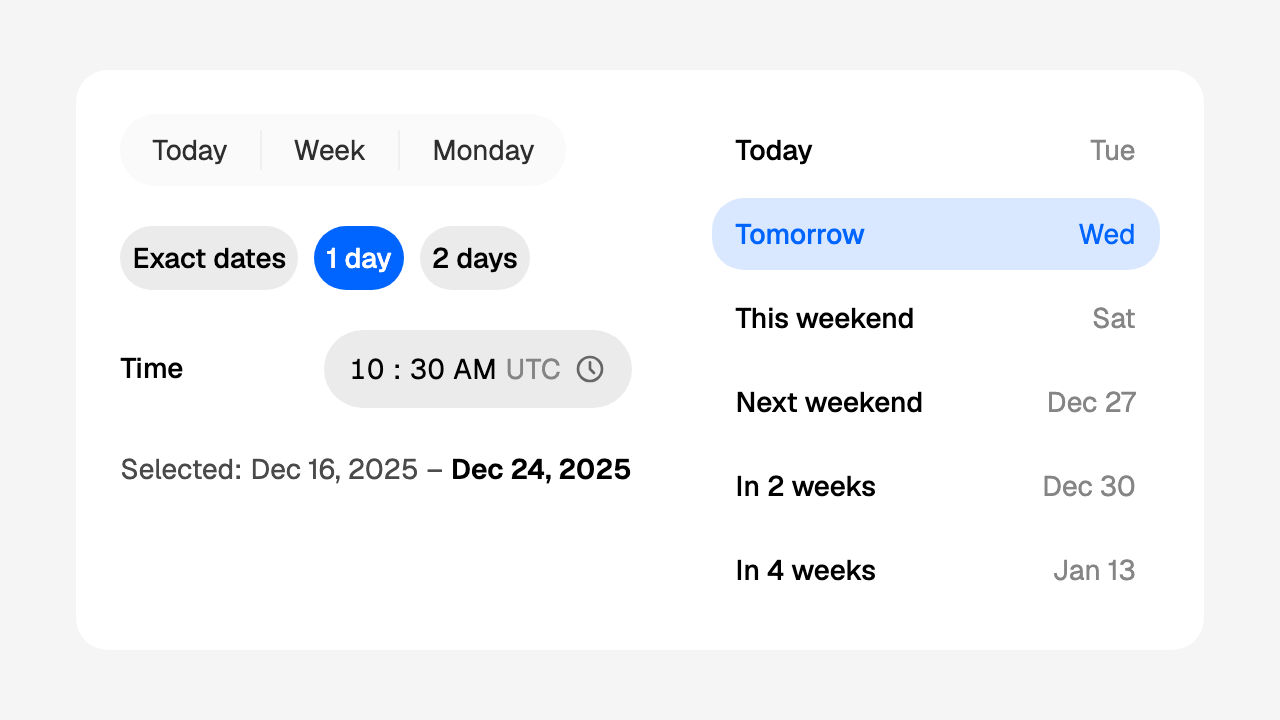
QuickRanges
calendar.html's quick-range row: three plain actions, Today, Week
and Monday, in one bar. Nothing in it stays pressed; each press works
out its value and hands it to on_change.
import json

from workpeg.ui import App, Column, State, Text
from workpeg.ui.calendar import QuickRanges


class Quick(App):
    day = State(None)
    span = State(None)

    def set_day(self, value):
        self.day = value

    def set_span(self, value):
        self.span = value

    def build(self):
        return Column(
            QuickRanges(on_change=self.set_day, current_date="2025-12-16"),
            QuickRanges(on_change=self.set_span, mode="range",
                        current_date="2025-12-16", starting_day_of_week=1),
            Text(json.dumps(self.day)),
            Text(json.dumps(self.span)),
        )
| Button | mode="single" gives |
mode="range" gives |
|---|---|---|
| Today | today, "2025-12-16" |
today alone, {"start": "2025-12-16", "end": "2025-12-16"} |
| Week | a week from today, "2025-12-23" |
this week, {"start": "2025-12-15", "end": "2025-12-21"} |
| Monday | the next Monday, "2025-12-22" |
next Monday to its Sunday, {"start": "2025-12-22", "end": "2025-12-28"} |
The examples are for Tuesday 16 December 2025, with weeks that start on
Monday. "The next Monday" is always after today, so on a Monday it is a
week away. "This week" starts on starting_day_of_week (1 for Monday to 7
for Sunday), or on the first day of locale's week when it is None:
Sunday in en-US, Monday in en-GB. A first day that is not 1 to 7 is
read as None, as the calendar beside the row reads it. A range that
would end past the calendar's last day, 9999-12-31, is never handed on
by halves: that press picks nothing.
Today is current_date when it is given (a demo, a test), else today in
time_zone, else in the viewer's zone. current_date is read as the
calendar beside the row reads it, so a datetime, or a day that does not
exist, is no date: the row and the calendar always share one today. It
is read when the button is pressed, not when the page was drawn, so a
page left open past midnight picks the new day.
locale is the language whose week it is, the page's when it is None.
Give the row the locale you give the calendar beside it and "this week"
is always one of the calendar's rows: an en-GB calendar on an en-US
page starts its rows on Monday, and so does the row's week. The day is
dates.week_start(locale), which the calendar
reads too. The panels hand their locale to their quick dates.
Pass Buttons as children and they are the row instead, each running its
own handler; on_change is then not called:
import json

from workpeg.ui import App, Button, Column, State, Text, dates
from workpeg.ui.calendar import QuickRanges


class OwnButtons(App):
    day = State(None)

    def tomorrow(self):
        self.day = dates.add_days(dates.today(), 1)

    def friday(self):
        self.day = dates.next_weekday(dates.today(), dates.FRIDAY, True)

    def build(self):
        return Column(
            QuickRanges(Button("Tomorrow", on_click=self.tomorrow),
                        Button("Friday", on_click=self.friday)),
            Text(json.dumps(self.day)),
        )
| Keyword | Type | Default |
|---|---|---|
*children |
Buttons to use instead of the three |
none |
on_change |
a handler: gets a date, or a range in mode="range" |
none |
mode |
"single" or "range" |
"single" |
current_date |
an ISO date: today, for a demo or a test | today |
time_zone |
an IANA zone that decides today | the viewer's |
starting_day_of_week |
1 (Monday) to 7 (Sunday), or None for the locale's |
None |
locale |
a BCP 47 tag whose week "this week" is | the page's |
labels |
a dict of words (below) | English |
DurationModes
calendar.html's duration-mode row: a single choice of how long a range
is. 0 means exact dates; any other number is a range of that many days,
which a range picker takes as its range_length, so one press picks the
whole span:
import json

from workpeg.ui import App, CalendarDateRangePicker, Column, State, Text
from workpeg.ui.calendar import DurationModes


class Stay(App):
    span = State(None)
    days = State(0)

    def set_span(self, value):
        self.span = value

    def set_days(self, value):
        self.days = value

    def build(self):
        return Column(
            DurationModes(value=self.days, on_change=self.set_days,
                          options=[0, 1, 2, 7, 14]),
            CalendarDateRangePicker(value=self.span, on_change=self.set_span,
                                    range_length=self.days or None),
            Text(json.dumps(self.span)),
        )
The chips read "Exact dates", "1 day", "2 days", "7 days" and "14 days".
A length a range picker cannot take (1.5, "7", None, more than 366)
is left out, and 7.0, as JSON may give it, is 7; options that are no
list at all (7) are the default three.
on_change gets the number pressed; pressing the chip already chosen
changes nothing. Changing the length never rewrites a range already
picked: it applies from the next press on the calendar.
The row is one Tab stop and is announced as a radio group, "Duration":
arrow keys move between the chips, Space or Enter picks one. Each chip is
the design's large tag, grey at rest and brand blue when chosen, and the
row wraps; inside a CalendarCard it wraps at one month's width.
| Keyword | Type | Default |
|---|---|---|
value |
the length chosen, a whole number of days | 0 |
on_change |
a handler: gets the length pressed | none |
options |
the lengths to offer, whole days from 0 to 366 | [0, 1, 2] |
labels |
a dict of words (below) | English |
TimeRow
calendar.html's time row: a label beside the time pill. The pill is a
DateSegments(kind="time", appearance="pill"):
the time is typed a part at a time, its clock opens the
wheel, and the zone's short name follows it.
import json

from workpeg.ui import App, Column, State, Text
from workpeg.ui.calendar import TimeRow


class Times(App):
    start = State("09:00")
    end = State(None)

    def set_start(self, value):
        self.start = value

    def set_end(self, value):
        self.end = value

    def build(self):
        return Column(
            TimeRow("Start time", value=self.start, on_change=self.set_start,
                    minute_interval=15, first_time="08:00",
                    last_time="18:00"),
            TimeRow("End time", value=self.end, on_change=self.set_end,
                    seconds=True, show_zone=False),
            Text(json.dumps([self.start, self.end])),
        )
value is "HH:MM", or "HH:MM:SS" with seconds=True, always 24-hour
whatever the display, or None; on_change gets one once every part is
filled, and None once when a time it had stops being whole (a part
cleared, or typed only in part), as any
DateSegments does. A page that
keeps its time meanwhile, as the panels do, ignores that None, and the
row keeps what is typed until the time is whole again. The label names
the pill for a screen reader too. Inside a
CalendarCard the row is at most one month wide, so under two or three
months the label and the pill stay together.
| Keyword | Type | Default |
|---|---|---|
label |
text, the first positional argument | "Time" |
value |
an ISO time, or None |
None |
on_change |
a handler: gets the time, or None once when a part is cleared |
none |
seconds |
bool |
False |
use_24h_format |
True, False, or None for the locale's |
None |
minute_interval |
a step that divides 60 | 1 |
show_zone |
bool |
True |
time_zone |
an IANA zone, for the zone's name | the viewer's |
locale |
a BCP 47 tag | the page's |
first_time, last_time |
ISO times the value must lie between | none |
disabled |
bool |
False |
PresetTile
calendar.html's preset row: a button that stays pressed, its words in two
slots the way a ListTile takes them, title at the start and trailing
at the end in the quieter colour, both brand blue once it is pressed.
from workpeg.ui import App, Column, State, Text
from workpeg.ui.calendar import PresetTile


class Tiles(App):
    when = State("tomorrow")

    def pick(self, which):
        self.when = which

    def build(self):
        return Column(
            PresetTile(title=Text("Tomorrow"), trailing=Text("Wed"),
                       selected=self.when == "tomorrow",
                       on_change=lambda on: self.pick("tomorrow")),
            PresetTile(title=Text("Next week"), trailing=Text("Dec 22"),
                       selected=self.when == "next_week",
                       on_change=lambda on: self.pick("next_week")),
            gap=6,
        )
It is a standalone ToggleButton:
selected is the state, on_change gets the new boolean, and each tile is
its own Tab stop. The colour of the trailing words is the
--cal-preset-trailing token, the placeholder grey unless you set it on
the tile or anything around it.
| Keyword | Type | Default |
|---|---|---|
title |
a widget | none |
trailing |
a widget | none |
selected |
bool |
False |
on_change |
a handler: gets True or False |
none |
disabled |
bool |
False |
PresetList
A column of preset tiles, calendar.html's preset list: Today, In an hour, Tomorrow, This weekend, Next weekend, In 2 weeks and In 4 weeks, each with the day or the time it stands for beside it.
import json

from workpeg.ui import App, Column, State, Text
from workpeg.ui.calendar import PresetList


class Remind(App):
    when = State(None)

    def set_when(self, value):
        self.when = value

    def build(self):
        return Column(
            PresetList(value=self.when, on_change=self.set_when),
            Text(json.dumps(self.when)),
        )
value is a datetime, "2025-12-17T00:00", or with time=False a date,
and on_change gets the preset's value. A date preset keeps the time of
the value already picked, or default_time; "In an hour" is an hour of
time from now, to the minute, so on the night the clocks change it is
still an hour away (01:30 EDT in New York is 01:30 EST, the second time
the clock reads it) and never a time the zone skips. The tile shown pressed is the one the value is (see
Presets and when they are computed),
and pressing it again changes nothing.
| Keyword | Type | Default |
|---|---|---|
value |
an ISO datetime (a date with time=False), or None |
None |
on_change |
a handler: gets the preset's value | none |
presets |
a list of preset dicts (below) | the design's seven |
time |
bool: datetimes, or dates |
True |
current_date |
an ISO date: today, for a demo or a test | today |
time_zone |
an IANA zone that decides today and now | the viewer's |
locale |
a BCP 47 tag, for the trailing words | the page's |
default_time |
the ISO time a date preset takes when the value has none | "00:00" |
divided |
bool: the divider the preset picker draws beside its month |
False |
labels |
a dict of words (below) | English |
The list is 224px wide either way: divided=True draws a hairline at
its end with 12px before it, inside those 224px, so its tiles are 211px
wide.
RangeSummary
calendar.html's range summary: the range picked, in words, the end in bold. It shows nothing until a start is picked, and the start alone while the range is open:
from workpeg.ui import App, CalendarDateRangePicker, Column, State, Text
from workpeg.ui.calendar import RangeSummary


class Summary(App):
    span = State({"start": "2025-12-16", "end": "2025-12-24"})

    def set_span(self, value):
        self.span = value

    def build(self):
        return Column(
            CalendarDateRangePicker(value=self.span, on_change=self.set_span),
            RangeSummary(value=self.span),
            RangeSummary(Text("Your stay:"), value=self.span,
                         style_name="long"),
        )
The first reads "Selected: Dec 16, 2025 – Dec 24, 2025"; the second
"Your stay: December 16, 2025 – December 24, 2025": children replace the
"Selected:" lead. The dates are written in style_name, any
dates.format style, in locale's words. A range
of datetimes shows its dates, and its times too in the "datetime"
style. The words run on to a second line where the summary is narrow, as
a sentence does: a date that does not fit moves down whole. A value that is not a range dict (a range field's
"2025-12-16/2025-12-24" text, a list) shows nothing, as does an end that
is not an ISO date or datetime, so a table row holding the wrong shape
never stops the page drawing.
| Keyword | Type | Default |
|---|---|---|
*children |
widgets to lead with instead of "Selected:" | none |
value |
a range dict, or None |
None |
style_name |
a dates.format style |
"medium" |
locale |
a BCP 47 tag | the page's |
labels |
a dict of words (below) | English |
The panels
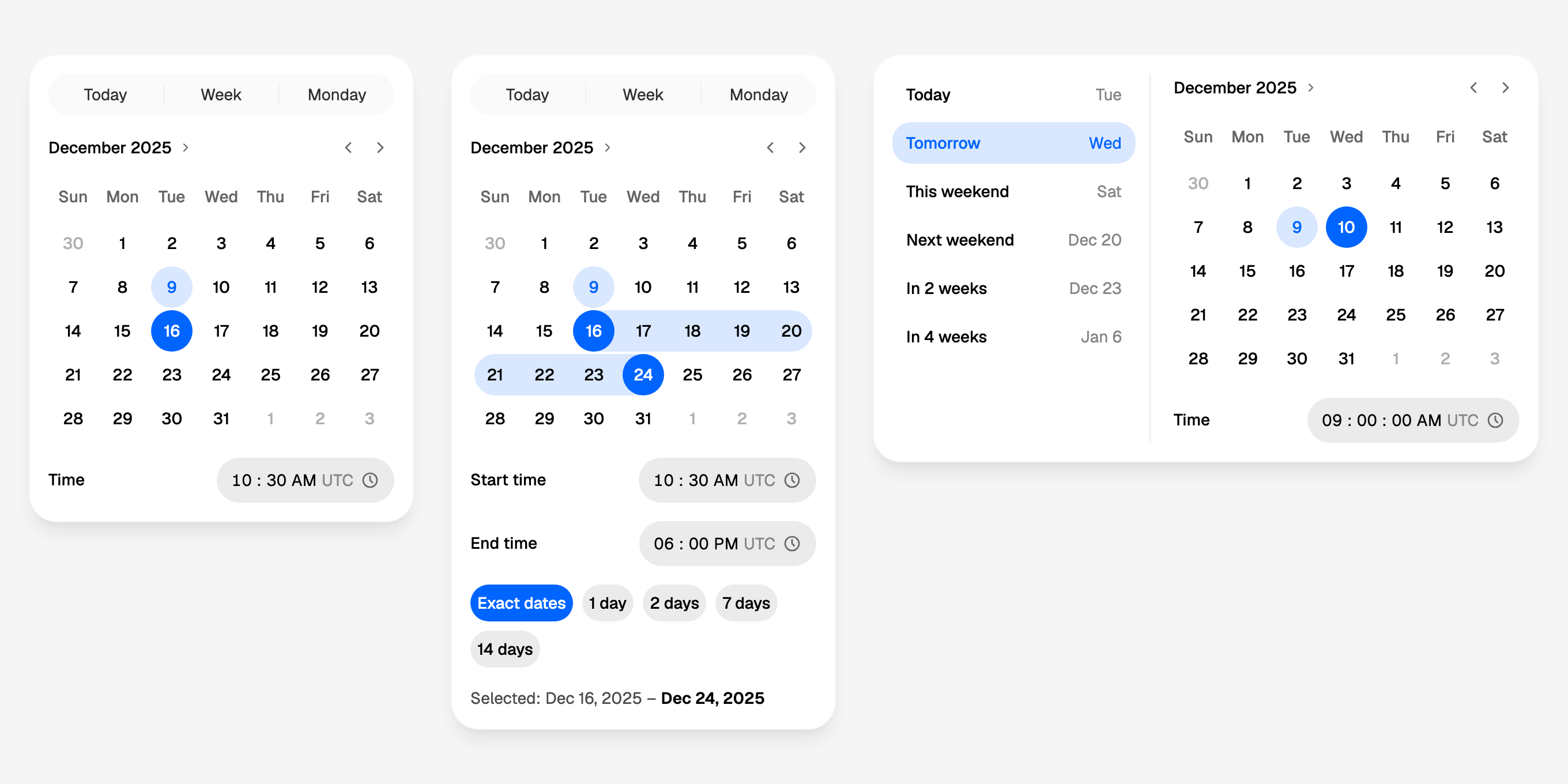
Each panel is one value and one on_change. Its pieces hand it their own
values (a day from the month or the quick dates, a time from a time row,
a preset from the list), and the panel works out the new value from them
and the one it holds, then calls on_change once. A page keeps that one
value in one State.
All three take the calendar's own keywords and hand them to their
calendar as they come: first_date, last_date, current_date,
selectable_day_predicate, disabled_dates, disabled_weekdays,
markers or event_loader, starting_day_of_week, locale and
time_zone, each None unless given, as on
CalendarDatePicker. A
predicate or a loader may be a lambda or a method of your page; a string
there, which only data could put there, is never taken as the name of a
method: the calendar warns and leaves it out, as it does a number. The
quick dates and the presets take today, the zone, the week start and the
language from the same keywords, so every piece of a panel has one
today. The time rows take use_24h_format, minute_interval and
show_zone, as TimeRow does.
The quick dates and the presets are shortcuts the panel offers, not days
pressed on the month, so the calendar's rules do not hold them back: with
first_date tomorrow, "Today" still picks today. Where that matters,
leave the quick dates out (quick_ranges=False), give the presets you
mean, or compose the panel from the pieces with your own buttons.
DatePickerPanel
calendar.html's Picker Panel for one date and its time: the quick dates, a flat month and a time row, in one card.
import json

from workpeg.ui import App, Column, State, Text
from workpeg.ui.calendar import DatePickerPanel


class Due(App):
    due = State("2025-12-16T10:30")

    def set_due(self, value):
        self.due = value

    def build(self):
        return Column(
            DatePickerPanel(value=self.due, on_change=self.set_due),
            Text(json.dumps(self.due)),
        )
value is a datetime, "2025-12-16T10:30". A day picked, on the month
or from "Today", "Week" and "Monday", keeps the time already set: the
20th pressed gives "2025-12-20T10:30". A time typed keeps the day:
08:15 gives "2025-12-16T08:15". With no value yet, a day takes
default_time ("00:00"), and a time takes today. A time cleared, or
typed only in part, changes nothing until it is whole again. A
default_time that is no ISO time ("9:00") makes no datetime, so a day
pressed with no time yet picks nothing: write it "09:00".
With time=False there is no time row and the value is a date,
"2025-12-16". quick_ranges=False leaves the quick dates out. The
panel holds no state of its own.
| Keyword | Type | Default |
|---|---|---|
value |
an ISO datetime (a date with time=False), or None |
None |
on_change |
a handler: gets the new value | none |
time |
bool: a datetime and its time row, or a date |
True |
seconds |
bool: the time row shows seconds |
False |
quick_ranges |
bool: the Today, Week and Monday row |
True |
default_time |
the ISO time a day takes when there is none yet | "00:00" |
labels |
a dict of words (below) | English |
the calendar's: first_date, last_date, current_date, selectable_day_predicate, disabled_dates, disabled_weekdays, markers, event_loader, starting_day_of_week, locale, time_zone |
as CalendarDatePicker takes them |
None |
the time row's: use_24h_format, minute_interval, show_zone |
as TimeRow takes them |
None, 1, True |
DateRangePickerPanel
calendar.html's Range Picker: the quick dates, one to three flat months under one pair of arrows, the start and end times, the duration chips and a summary of what is picked.
import json

from workpeg.ui import App, Column, State, Text
from workpeg.ui.calendar import DateRangePickerPanel


class Trip(App):
    stay = State({"start": "2025-12-16T10:30", "end": "2025-12-24T10:30"})

    def set_stay(self, value):
        self.stay = value

    def build(self):
        return Column(
            DateRangePickerPanel(value=self.stay, on_change=self.set_stay,
                                 months=2, times=True,
                                 durations=[0, 1, 2, 7, 14], summary=True),
            Text(json.dumps(self.stay)),
        )
value is a range, {"start": "2025-12-16", "end": "2025-12-24"}, of
datetimes with times=True. The first press of a range hands on an open
one, {"start": "2025-12-16T10:30", "end": None}, and the second the
whole range; the press rules are the
range picker's. "Today",
"Week" and "Monday" pick a whole range at once: today alone, this week,
next Monday to its Sunday.
With times=True, each end keeps its own time when days are picked
again, or takes default_start_time ("00:00") and default_end_time
("23:59"), so a range with no times typed covers whole days. A time
typed keeps the days, and a start time with nothing picked starts the
range today. An end time needs an end day: typed while the range is open,
or before anything is picked, it waits in the end row and the end day
picked next takes it, so start day, end time, end day works in that
order. When days are picked again, the first press hands on an open
range, and the end time already set waits the same way for the second.
The end never comes before the start. On one day, the end time may
not be earlier than the start time: typed earlier, the value keeps its
end, and the field says "Choose a time in range" once you leave it. A start time typed past the end
takes the end with it, and a day picked twice under times that cross
gives a range of no length, ending when it starts.
durations adds the chips, whole days with 0 for exact dates. The chip
chosen is the panel's own state, and the calendar's
range_length from the next
press: with "7 days" chosen, one press picks a week. Choosing a chip never
rewrites the range already picked. A chip counts only while the page
offers it: take the chips away (durations=None), or give lengths without
the one chosen, and a press picks an open range again, since nothing on
screen could undo it. summary=True adds the summary below.
months is 1, 2 or 3; under more than one month the rows keep to one
month's width.
| Keyword | Type | Default |
|---|---|---|
value |
a range dict of ISO dates (datetimes with times=True), or None |
None |
on_change |
a handler: gets the new range | none |
months |
1, 2 or 3 |
1 |
times |
bool: datetimes and the start and end time rows, or dates |
False |
seconds |
bool: the time rows show seconds |
False |
durations |
the chips' lengths, whole days from 0 to 366, or None for no chips |
None |
summary |
bool: the range in words below |
False |
quick_ranges |
bool: the Today, Week and Monday row |
True |
default_start_time, default_end_time |
the ISO times a range's ends take when they have none | "00:00", "23:59" |
labels |
a dict of words (below) | English |
the calendar's: first_date, last_date, current_date, selectable_day_predicate, disabled_dates, disabled_weekdays, markers, event_loader, starting_day_of_week, locale, time_zone |
as CalendarDateRangePicker takes them; the predicate may take (day, start, end) |
None |
the time rows': use_24h_format, minute_interval, show_zone |
as TimeRow takes them |
None, 1, True |
PresetDatePicker
calendar.html's Preset Picker: a list of presets beside a flat month and a time row, in one card laid out as a row.
import json

from workpeg.ui import App, Column, State, Text
from workpeg.ui.calendar import PresetDatePicker


class Reminder(App):
    remind = State(None)

    def set_remind(self, value):
        self.remind = value

    def build(self):
        return Column(
            PresetDatePicker(value=self.remind, on_change=self.set_remind),
            Text(json.dumps(self.remind)),
        )
value is a datetime, or a date with time=False. A preset pressed hands
on what it stands for at that moment, as in PresetList,
whose presets it takes (the design's seven by default); a day picked
keeps the time already set; a time typed keeps the day. The tile shown
pressed is the preset the value is.
The time row shows seconds, as the design draws it, unless
seconds=False. A day picked before any time takes default_time as it
is written, "00:00", so give default_time="00:00:00" for a value with
seconds from the first press; a value without seconds stays as it is
until a time is typed, however often focus passes through the row. The
panel holds no state of its own. On a phone (below 640px wide) the
presets stack above the month, as wide as it, with no divider: the row is
578px, wider than a phone.
| Keyword | Type | Default |
|---|---|---|
value |
an ISO datetime (a date with time=False), or None |
None |
on_change |
a handler: gets the new value | none |
presets |
a list of preset dicts, as PresetList takes them |
the design's seven |
time |
bool: a datetime and its time row, or a date |
True |
seconds |
bool: the time row shows seconds |
True |
default_time |
the ISO time a day takes when there is none yet | "00:00" |
labels |
a dict of words (below) | English |
the calendar's: first_date, last_date, current_date, selectable_day_predicate, disabled_dates, disabled_weekdays, markers, event_loader, starting_day_of_week, locale, time_zone |
as CalendarDatePicker takes them |
None |
the time row's: use_24h_format, minute_interval, show_zone |
as TimeRow takes them |
None, 1, True |
Composing your own
A panel is the design's arrangement with its values made one. When you
want another arrangement, or the values apart, build it from the pieces
in a CalendarCard. calendar.html's single-month
Picker Panel with durations is built this way:
import json

from workpeg.ui import (App, CalendarCard, CalendarDateRangePicker, Column,
                        State, Text)
from workpeg.ui.calendar import DurationModes, QuickRanges, TimeRow


class PickerPanel(App):
    span = State(None)
    time = State("10:30")
    days = State(0)

    def set_span(self, value):
        self.span = value

    def set_time(self, value):
        self.time = value

    def set_days(self, value):
        self.days = value

    def build(self):
        return Column(
            CalendarCard(
                QuickRanges(mode="range", on_change=self.set_span),
                CalendarDateRangePicker(value=self.span,
                                        on_change=self.set_span,
                                        surface="flat",
                                        range_length=self.days or None),
                TimeRow("Time", value=self.time, on_change=self.set_time),
                DurationModes(value=self.days, on_change=self.set_days),
            ),
            Text(json.dumps([self.span, self.time, self.days])),
        )
Every value stays the page's own: span, time and days each arrive
separately, and the page decides what they make together. The calendar
is surface="flat", so the card's chrome is the only one, and the rows
keep to one month's width inside the card.
The same pattern is how to customise days inside a panel: a panel cannot
take a day_builder (a Component cannot hand a builder on), so put your
own calendar, with its day_builder, in a
CalendarCard beside the pieces you want:
from workpeg.ui import (App, CalendarCard, CalendarDatePicker, Column,
                        State, Text)
from workpeg.ui.calendar import QuickRanges, TimeRow


class Shifts(App):
    day = State("2025-12-16")
    at = State("09:00")
    staffed = State({"2025-12-16": 3, "2025-12-17": 1})

    def set_day(self, value):
        self.day = value

    def set_at(self, value):
        self.at = value

    def build(self):
        return CalendarCard(
            QuickRanges(on_change=self.set_day),
            CalendarDatePicker(
                value=self.day, on_change=self.set_day, surface="flat",
                day_builder=lambda day: Column(
                    Text(day["label"]),
                    Text(str(self.staffed[day["date"]])
                         if day["date"] in self.staffed else "",
                         style={"font-size": "10px", "line-height": "12px"}),
                    gap=0, align="center"),
                style={"--calendar-day-size": "44px"}),
            TimeRow("Start", value=self.at, on_change=self.set_at),
        )
Labels and other languages
A library cannot reach the page's translations, so
every word a building block or a panel writes comes from its labels
dict, with the English default for any key left out, or whose word is not
text or is empty (None or "" from a translation not filled in yet, a
number). Labels that are not a dict at all ("es", a list) give the
English for every word; whatever shape a table row hands over, the page
keeps drawing. A key is one word wherever it is read (today is "Today"
in the quick dates and in the preset list, time each panel's time row)
and no two words share a key, so one dict serves a whole panel: a panel
hands its labels to every piece it holds.
import json

from workpeg.ui import App, Column, State, Text
from workpeg.ui.calendar import DurationModes, QuickRanges


class Francais(App):
    day = State(None)
    days = State(0)

    def set_day(self, value):
        self.day = value

    def set_days(self, value):
        self.days = value

    def build(self):
        return Column(
            QuickRanges(on_change=self.set_day,
                        labels={"today": "Aujourd'hui", "week": "Semaine",
                                "monday": "Lundi",
                                "quick_dates": "Raccourcis"}),
            DurationModes(value=self.days, on_change=self.set_days,
                          labels={"exact": "Dates exactes", "day": "{n} jour",
                                  "days": "{n} jours", "duration": "Durée"}),
            Text(json.dumps(self.day)),
        )
| Widget | Key | English |
|---|---|---|
QuickRanges |
today |
Today |
QuickRanges |
week |
Week |
QuickRanges |
monday |
Monday |
QuickRanges |
quick_dates |
Quick dates |
DurationModes |
exact |
Exact dates |
DurationModes |
day |
{n} day |
DurationModes |
days |
{n} days |
DurationModes |
duration |
Duration |
PresetList |
today |
Today |
PresetList |
in_an_hour |
In an hour |
PresetList |
tomorrow |
Tomorrow |
PresetList |
this_weekend |
This weekend |
PresetList |
next_weekend |
Next weekend |
PresetList |
in_2_weeks |
In 2 weeks |
PresetList |
in_4_weeks |
In 4 weeks |
RangeSummary |
selected |
Selected: |
DatePickerPanel |
time |
Time |
DateRangePickerPanel |
start_time |
Start time |
DateRangePickerPanel |
end_time |
End time |
PresetDatePicker |
time |
Time |
quick_dates and duration are the rows' accessible names, read aloud
and never shown. A panel's own words are its time rows' labels; the rest
of a panel's words are its pieces', from the same dict:
import json

from workpeg.ui import App, Column, State, Text
from workpeg.ui.calendar import DateRangePickerPanel


class Estancia(App):
    stay = State(None)

    def set_stay(self, value):
        self.stay = value

    def build(self):
        return Column(
            DateRangePickerPanel(
                value=self.stay, on_change=self.set_stay, times=True,
                durations=[0, 1, 2], summary=True,
                labels={"today": "Hoy", "week": "Semana", "monday": "Lunes",
                        "quick_dates": "Atajos", "start_time": "Entrada",
                        "end_time": "Salida", "exact": "Fechas exactas",
                        "day": "{n} día", "days": "{n} días",
                        "duration": "Duración", "selected": "Elegido:"},
                locale="es-ES"),
            Text(json.dumps(self.stay)),
        )
In day and days, {n} is replaced by the number, once, wherever it
stands ("Für {n} Tage"); words without it are shown as they are, and no
other brace is read. days is used for every number but 1. A label is
always text: markup in one is shown as written, never drawn.
TimeRow and PresetTile write no words of their own: their label,
title and trailing are yours. The dates and times the blocks write (a
preset's "Wed", a summary's "Dec 16, 2025") are in the locale given, or
the page's language.
Presets and when they are computed
A preset is a dict with an id, a label and how far from now it is,
in one of three ways:
| Key | Means | Example |
|---|---|---|
days |
that many days from today (negative is back) | {"id": "tomorrow", "label": "Tomorrow", "days": 1} |
minutes |
that many minutes from now: a time preset | {"id": "soon", "label": "In 30 minutes", "minutes": 30} |
weekday, weeks |
that weekday (1 Monday to 7 Sunday) on or after today, then weeks whole weeks on |
{"id": "next_friday", "label": "Next Friday", "weekday": 5, "weeks": 1} |
A preset with none of them is today. Each count is a whole number: a
preset whose count is not one ("1", None, 1.5) stands for no day,
shows no trailing words and does nothing when pressed, in the page and in
Python alike. A preset that is not a dict whose id and label are text
(a string, a dict without its id) is left out, and presets that are no
list at all (5) are the design's seven, so presets read from a table
row never stop the page drawing. The design's seven are today
(days 0), in_an_hour (minutes 60), tomorrow (days 1), this_weekend
(weekday 6), next_weekend (weekday 6, weeks 1), in_2_weeks (days 14)
and in_4_weeks (days 28).
import json

from workpeg.ui import App, Column, State, Text
from workpeg.ui.calendar import PresetList


class Followups(App):
    when = State(None)

    def set_when(self, value):
        self.when = value

    def build(self):
        return Column(
            PresetList(value=self.when, on_change=self.set_when,
                       time=False,
                       presets=[{"id": "tomorrow", "label": "Tomorrow",
                                 "days": 1},
                                {"id": "monday", "label": "Monday",
                                 "weekday": 1},
                                {"id": "fortnight", "label": "In 2 weeks",
                                 "days": 14}]),
            Text(json.dumps(self.when)),
        )
When. Three things happen at three moments:
- The trailing words are worked out at render, from today and now: the time for a time preset ("10:05 AM"), the short weekday for a day less than a week away ("Wed"), and the month and day further off ("Dec 30").
- The value is worked out again when the tile is pressed, so a tile pressed a minute after the page was drawn gives the minute it was pressed, and a page left open past midnight gives the new day.
- The tile shown pressed is worked out from the value at every render, never stored. The first time preset whose datetime is the value wins; else the first date preset on the value's day, whatever its time. "In an hour" pressed at 9:05 shows pressed until 9:06, and from then on the value (10:05 today) is "Today".
Today is current_date when it is given (a date: a datetime is not
one), else today in time_zone, else in the viewer's zone. Now is the
clock's instant, read as a time in that zone, or the clock's time on
current_date's day when there is one. A time preset counts its minutes
as time passing from that instant, not on the clock's face, which is why
"In an hour" is an hour away even across a change of the clocks. With time=False the value is a date, and time
presets are left out: a date has no hour to hold.
A date preset keeps the time of the value already picked, so moving a
reminder from today to tomorrow keeps it at 14:45; with no value, or a
value with no time, it takes default_time.
In Python
The building blocks and the panels are Python as well as a page. Their
date logic is the dates capability,
whose Python module is a real implementation, so the methods that work
out values (what a quick date picks, what a preset stands for, the value
a panel makes of a day and a time, the range it makes of two days and two
times) run under CPython and give what the page gives: the SDK's own
tests call each one both ways, on tables of edge cases, and require the
same answer.